Difference between revisions of "Manuals/calci/REPLACEB"
Jump to navigation
Jump to search
(Created page with "<div id="6SpaceContent" class="zcontent" align="left"> '''REPLACEB'''(Old _Text, Start_Num, Num_Char, New_Text) where, '''Old_Text''' - is the text inwhich to repla...") |
|||
| Line 1: | Line 1: | ||
| − | + | =REPLACEB(Old_Text, Start_Num, Num_Char, New_Text)= | |
| − | + | *where, <math>Old_Text</math> is the original or old text | |
| + | *<math>Start_Num</math> represents the character position in old text | ||
| + | *<math>Num_Char</math> represents the number of characters to be replaced in old text | ||
| + | *<math>New_Text</math> is the new text with which specified number of characters in old text are replaced | ||
| − | + | REPLACEB() replaces a part of old text string with a new text string, based on the number of bytes specified. | |
| − | + | == Description == | |
| − | ''' | + | For Example, |
| + | REPLACEB("JOHN",2,1,"$") returns ''J$HN'' | ||
| − | + | *This function counts and replaces specified number of byte characters with a new text string. | |
| + | *REPLACEB is intended for languages that use double-byte character set (DBCS). | ||
| + | *If <math>Start_Num</math> < 1, Calci displays #N/A message. | ||
| + | *If <math>Num_Char</math> < 1, Calci displays #N/A message. | ||
| − | + | == Examples == | |
| − | + | <div id="6SpaceContent" class="zcontent" align="left"> | |
| − | |||
| − | <div id=" | ||
| − | + | {| id="TABLE3" class="SpreadSheet blue" | |
| + | |- class="even" | ||
| + | | class="ssh1_f" |ColumnA | ||
| + | | class=" " |ColumnB | ||
| + | | class=" " |ColumnC | ||
| − | + | |- class="odd" | |
| − | + | | class="ssh1_f" |123456 | |
| − | + | | class=" " | | |
| + | | class=" " | | ||
| − | + | |- class="even" | |
| + | | class="ssh1_f" |***** | ||
| + | | class=" " | | ||
| + | | class=" " | | ||
| − | + | |- class="odd" | |
| + | | class="ssh1_f" |STAR | ||
| + | | class=" " | | ||
| + | | class=" " | | ||
| − | + | |- class="odd" | |
| − | - | + | | class="ssh1_f" | |
| − | + | | class=" " | | |
| − | + | | class=" " | | |
| − | + | |} | |
| − | |||
| − | |||
| − | |||
| − | |||
| − | |||
| − | |||
| − | |||
| − | |||
| − | |||
| − | |||
| − | |||
| − | |||
| − | + | =REPLACEB(A1,1,2,"*") : Replaces first two characters from old text with "*". Returns '''*3456''' as output. | |
| + | =REPLACEB(A2,2,1,"@") :Replaces first byte (2 characters) from old text with upper case "@". Returns '''@****''' as output. | ||
| + | =REPLACEB(A3,2,1,"aa") : Replaces 2nd character from old text with "aa". Returns '''SaaAR''' as output. | ||
| − | + | == See Also == | |
| − | + | *[[Manuals/calci/REPLACE | REPLACE]] | |
| − | + | *[[Manuals/calci/SUBSTITUTE | SUBSTITUTE]] | |
| − | + | *[[Manuals/calci/REPT | REPT]] | |
| − | |||
| − | |||
| − | |||
| − | |||
| − | |||
| − | |||
| − | |||
| − | |||
| − | + | ==References== | |
| − | |||
| − | |||
| − | |||
| − | |||
| − | |||
| − | |||
| − | |||
| − | |||
| − | |||
| − | |||
| − | |||
| − | |||
| − | |||
| − | |||
| − | |||
| − | |||
| − | |||
| − | |||
| − | |||
| − | |||
| − | |||
| − | |||
| − | |||
| − | |||
| − | |||
| − | |||
| − | |||
| − | |||
| − | |||
| − | |||
| − | |||
| − | |||
| − | |||
| − | |||
| − | |||
| − | |||
| − | |||
| − | |||
| − | |||
| − | |||
| − | |||
| − | |||
| − | |||
| − | |||
| − | |||
| − | |||
| − | |||
| − | |||
| − | |||
| − | |||
| − | |||
| − | |||
| − | |||
| − | |||
| − | |||
| − | |||
| − | |||
| − | |||
| − | |||
| − | |||
| − | |||
| − | |||
| − | |||
| − | |||
| − | |||
| − | |||
| − | |||
| − | |||
| − | |||
| − | |||
| − | + | *[http://en.wikipedia.org/wiki/Autocorrection Find and Replace] | |
| − | |||
Revision as of 23:29, 28 December 2013
REPLACEB(Old_Text, Start_Num, Num_Char, New_Text)
- where, is the original or old text
- represents the character position in old text
- represents the number of characters to be replaced in old text
- is the new text with which specified number of characters in old text are replaced
 is the original or old text
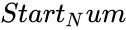 represents the character position in old text
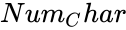 represents the number of characters to be replaced in old text
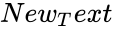 is the new text with which specified number of characters in old text are replaced
REPLACEB() replaces a part of old text string with a new text string, based on the number of bytes specified.
Description
For Example, REPLACEB("JOHN",2,1,"$") returns J$HN
- This function counts and replaces specified number of byte characters with a new text string.
- REPLACEB is intended for languages that use double-byte character set (DBCS).
- If < 1, Calci displays #N/A message.
- If < 1, Calci displays #N/A message.
Examples
| ColumnA | ColumnB | ColumnC |
| 123456 | ||
| ***** | ||
| STAR | ||
=REPLACEB(A1,1,2,"*") : Replaces first two characters from old text with "*". Returns *3456 as output.
=REPLACEB(A2,2,1,"@") :Replaces first byte (2 characters) from old text with upper case "@". Returns @**** as output.
=REPLACEB(A3,2,1,"aa") : Replaces 2nd character from old text with "aa". Returns SaaAR as output.