Difference between revisions of "Manuals/calci/TREND"
Jump to navigation
Jump to search
| Line 19: | Line 19: | ||
==Examples== | ==Examples== | ||
| + | |||
| + | {| class="wikitable" | ||
| + | |+Spreadsheet | ||
| + | |- | ||
| + | ! !! DAYS(x) !! SALES(y) !! x1 | ||
| + | |- | ||
| + | ! 1 | ||
| + | | 1 || 40 || 10 | ||
| + | |- | ||
| + | ! 2 | ||
| + | | 2 || 35 || 11 | ||
| + | |- | ||
| + | ! 3 | ||
| + | | 3 || 42 || 12 | ||
| + | |- | ||
| + | ! 4 | ||
| + | | 4 ||50 || 13 | ||
| + | |- | ||
| + | ! 5 | ||
| + | | 5 || 54 || 14 | ||
| + | ! 6 | ||
| + | | 6 || 49 || | ||
| + | |- | ||
| + | ! 7 | ||
| + | | 7 || 51 || | ||
| + | |- | ||
| + | ! 8 | ||
| + | | 8 || 58 || | ||
| + | |- | ||
| + | ! 9 | ||
| + | | 9 || 60 || | ||
| + | |} | ||
DAYS(x) SALES(y) x1 | DAYS(x) SALES(y) x1 | ||
1 40 10 | 1 40 10 | ||
| Line 32: | Line 64: | ||
62.611111111111114,etc | 62.611111111111114,etc | ||
TREND(B1:B9,A1:A9,C1:C5,FALSE) = | TREND(B1:B9,A1:A9,C1:C5,FALSE) = | ||
| − | = 82.84210546,etc | + | = 82.84210546,etc |
==See Also== | ==See Also== | ||
Revision as of 22:28, 17 February 2014
TREND(y,x,x1,c)
- is the set of y values.
- is the set of x values.
- is the new x value.
- is the constant value.
 is the set of y values.
 is the set of x values.
 is the new x value.
 is the constant value.
Description
- This function calculating the trend line using the given set of and values.
- Trend line is the straight line which joins two or more points in the upward direction.
- It is calculating using the equation ,which is the simple equation for the straight line.
- In this equation is the independent variable, is the dependent variable, is the slope of the line and is the constant which is equal to when .
- In , is the set of y-values to find the linear trend, is the set of x- values to find the linear trend, is the set of new x-values for which the function calculates corresponding new y-values and is the constant.
- It is either TRUE or FALSE. If c value is TRUE or omitted, then it is calculated normally.
- If value is FALSE, then , and . Here is required. , and are optional.
- If value is omitted, then it is assumed to be the array{1,2,3..} which is the same size of . If value is omitted, then it is assumed to be the same size of .
- If both and are omitted, then they are assumed to be the array {1,2,3..} which is the same size of y.
- function is used for polynomial curve fitting by regressing against the same variable raised to different powers.
- When entering an array constant for an argument such as , use commas to separate values in the same row and semicolons to separate rows.
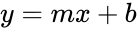 ,which is the simple equation for the straight line.
 is the slope of the line and
  is the constant which is equal to
  .
. ,
,  , and
, and  . Here
  function is used for polynomial curve fitting by regressing against the same variable raised to different powers.
Examples
| DAYS(x) | SALES(y) | x1 | |||||
|---|---|---|---|---|---|---|---|
| 1 | 1 | 40 | 10 | ||||
| 2 | 2 | 35 | 11 | ||||
| 3 | 3 | 42 | 12 | ||||
| 4 | 4 | 50 | 13 | ||||
| 5 | 5 | 54 | 14 | 6 | 6 | 49 | |
| 7 | 7 | 51 | |||||
| 8 | 8 | 58 | |||||
| 9 | 9 | 60 |
DAYS(x) SALES(y) x1 1 40 10 2 35 11 3 42 12 4 50 13 5 54 14 6 49 7 51 8 58 9 60 TREND(B1:B9,A1:A9,C1:C5) = 62.611111111111114,etc TREND(B1:B9,A1:A9,C1:C5,FALSE) = = 82.84210546,etc